Gigaset Cordless IP Phones - Manual Configuration
Configuring the phone via the Web configurator
We recommend using the base stations web user interface to configure each handset.
- Establish the telephone’s current IP address on the handset
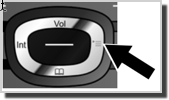
- Control button on right side of handset
- Settings (spanner icon)
- Registration


- Enter http:// and the telephone’s current IP address (for example: http://192.168.2.2) into the address field of the Web browser.
- Press the return key.
- A connection is established to the phone’s Web configurator.
On the Web UI follow the steps below
- Login default password: 0000
- Select: Settings |Telephony | Connections
- Select Edit the required extension
- Personal Provider Data
- Authentication Name: <your phone number> (e.g. 092420000)
- Authentication Password: <your password>
- User name: <your phone number> (e.g. 092420000)
- General Provider Data
- Domain: sip.techconnections.co.nz
- Proxy server Port: 5060
- Register server: sip.techconnections.co.nz
- Refresh Registration: 180 seconds
- Save settings: SET


NB – the Gigaset are typically slow to acknowledge the handsets registration and can take 30 seconds to change status to Registered.
Related Articles
Polycom VVX IP Phones – Manual Configuration
Polycom VVX IP Phones – Manual Configuration Customize the following features on your Polycom VVX handsets. Manually Configuration Changing the Handset label Extension dialling Handset Volume Upgrading Firmware Presence and BLF (Busy Lamp field) VVX ...Call Setup API
Tech Connections offers a basic call setup API which allows a user to setup a phone call between 2 phone numbers using a simple web query. The 2 phone numbers do not need to be on Tech Connections network, however if this is the case please be aware ...Yealink W52P DECT VoIP Phones - Manual Configuration
Quick Guide Step 1: Base Station The W52P base station can be powered by the supplied 120/240v adaptor or alternately from a POE switch. Install the 2 x AAA rechargeable batteries into the handset (and recharge if required). Enter the IP address in ...Mikrotik Router Configuration
Mikrotik routers are recommended for use with Tech Connections's Broadband service and they are very simple to setup. Tech Connections do NOT use PPP for connections to our network. You simply need to enable DHCP on the WAN interface and use VLAN 10 ...Outbound Trunking
Outbound trunking is a feature that allows you to present other direct dial-in (DDI) numbers as Caller ID on your registered trunk relieving phone administrators the onerous task of individually registering large blocks of numbers to preserve CLI. ...