VDSL Setup Instructions - Draytek DV130 example
General Instructions
Tech Connections Internet make our Internet connections as simple as possible for users to configure. Rather than having to login with username/password and realms etc. we do NOT support PPP at all and instead the user sends a simple DHCP request on their WAN port instead and Tech Connections Internet will return an IP address to the router.
Here are some generic settings for most ADSL/VDSL routers
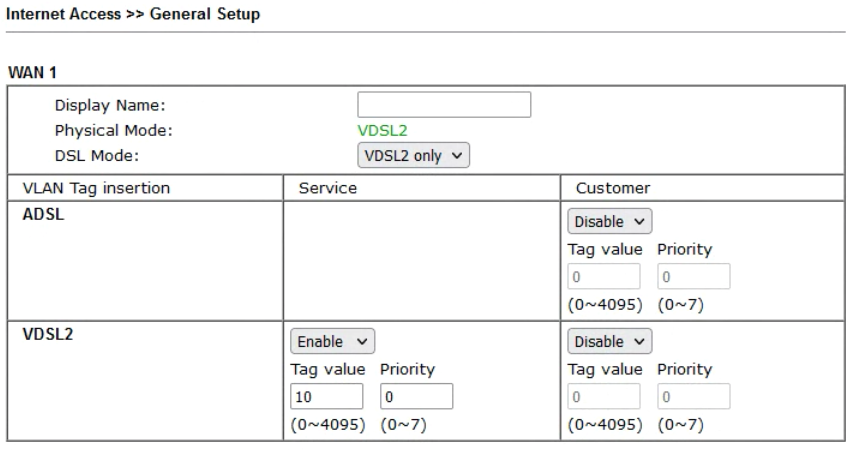
- Internet Access -> General Setup
- DSL Mode: VDSL2 only (or Auto for ADSL)
- ADSL - Disable VLAN tag insertions
- VDSL2 - Service Column
- VLAN tag insertion = Enable
- Tag value = 10
- Priority = 0
- VDSL2 - Customer Column
- VLAN tag insertion = Disable
- Internet Access -> PPPoE / PPPoA Client = Disabled (all settings should be greyed out)
- Internet Access -> MPoA / Static or Dynamic IP
- MPoA = Enabled
- Multi-PVC channel = Channel 2
- Encapsulation = 1483 Bridged IP LLC
- VPI = 0
- VCI = 110
- Modulation = Multimode
- Vlan = Enable
- MTU = 1500
- RIP Protocol = No
- Bridge Mode = Disabled (unless required)
- WAN IP Network Settings = Obtain an IP Address Automatically
- Default MAC Address
- DNS Servers = Should be able to leave blank and our DHCP service will send these to the router
Screenshots for Draytek DV130 VDSL router


Related Articles
Huawei HG659 Router VOIP Port Provisioning
The Huawei HG659 Router has a built-in VOIP port that can be configured to work with Tech Connections. The following guide explains how to configure a Tech Connections phone number on Phone Port on the router. 1. Configure your VOIP settings in the ...Microsoft Teams - Setup Instructions
Setup your Microsoft Teams environment This guide does not explain how to setup Microsoft Teams. The assumption is that you already have a Teams environment with Microsoft, your own domain(s) and users setup and this guide is focussed purely on how ...Mikrotik Router Configuration
Mikrotik routers are recommended for use with Tech Connections's Broadband service and they are very simple to setup. Tech Connections do NOT use PPP for connections to our network. You simply need to enable DHCP on the WAN interface and use VLAN 10 ...Call Setup API
Tech Connections offers a basic call setup API which allows a user to setup a phone call between 2 phone numbers using a simple web query. The 2 phone numbers do not need to be on Tech Connections network, however if this is the case please be aware ...How to Setup Faxmail
Quick Guide – Sending a fax Our fax-mail service allows “approved” email addresses to send faxes via our service. Before you can send or receive faxes follow the Quick Guide below to configure approved senders & receivers. Fax type: We support PDF, ...